
Here’s a quick review on how to set up CCU Bill Pay:
- Visit CCU Bill Pay
- Select Sign in or sign up link
- On the sign-in box, select Register at the bottom
- Enter your email address and create a password. You will receive an email requesting activation.
- In the confirmation email select Activate Account
- Once confirmed, you’ll be taken back to the login screen
- Enter your username and password, then choose Add Account, then enter your new five-digit account number from your invoice as well as your name.
- Once you create your account, you can sign up for eBill by going to the Contact Preferences tab to get your invoice sent by email
- You can also pay your current invoice, set up AutoPay and more
- You can also use the Quick Pay feature in CCU Bill Pay to pay an invoice without setting up an online account.
Video: How to Set Up Bill Pay
Other Payment Methods
Mail / In-person (office or drive-up window):
1111 McClure Road
Columbus, IN 47201
Pay by Phone: Automated Payment Line
(812) 668-8109
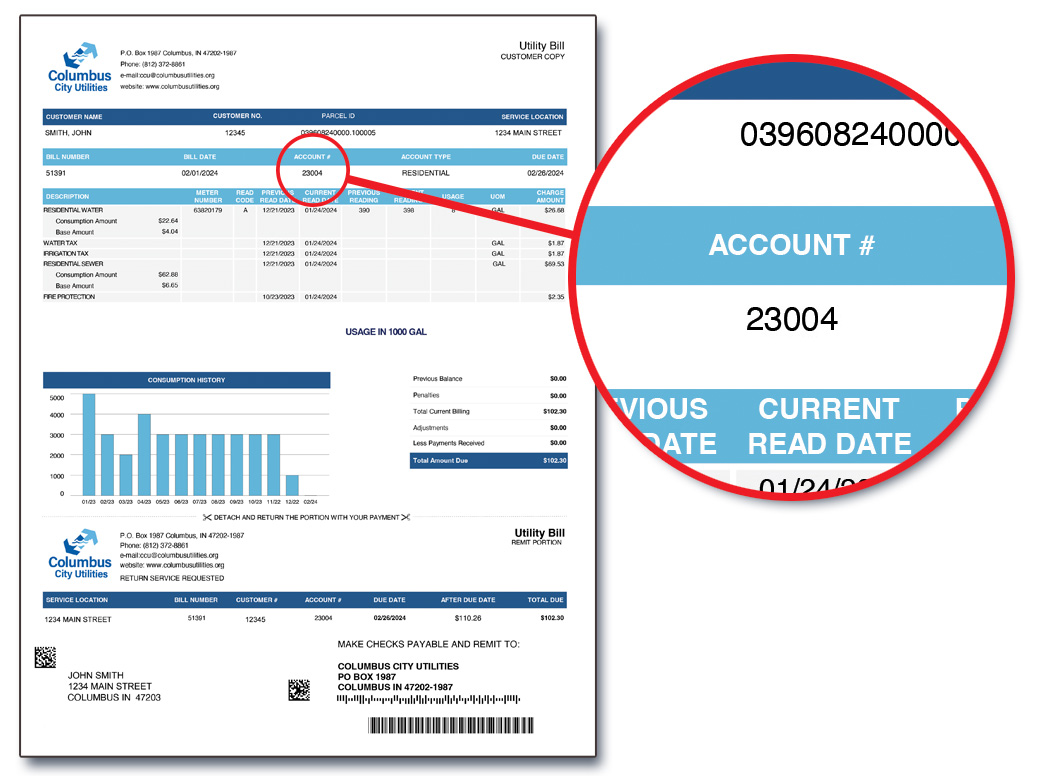
Sample Bill
Where to find your five-digit Account Number on your bill.